Putting an inspector's clipboard on a tablet — and rebuilding claims around it.

Digitizing HSB / Munich Re's field inspection and claims workflows — an Android tablet app for inspectors paired with a web claims system designed around what the field actually sends in.

At a glance
Client
HSB Munich Re, via HCL
Role
Senior UX/UI Designer Interaction lead
Timeline
2020 — 2021 Tablet + web shipped
Team
PM, Eng, Inspectors, Claims, QA Cross-functional, remote
TL;DR
HSB's boiler-and-machinery inspectors were working on paper forms designed in the 1980s and re-keying everything into claims at the desk. I led interaction design for an Android tablet field app and a connected web claims surface, eliminating the re-keying step and rebuilding claims intake around the data the field actually captures.
i. Context

Paper at the inspection. Re-keying at the desk. Errors at both ends.

The same data was being captured twice — once by hand on a clipboard, once by keyboard at a computer. Every transcription was an opportunity for an error.

HSB inspects boilers, pressure vessels, and industrial machinery — the kind of equipment that fails expensively and dangerously. Their inspectors are domain experts who spend their days in basements, plant rooms, and factory floors next to the equipment they're certifying.

The tools they were using had not kept up with what they did. Inspectors carried paper forms, hand-wrote findings, took photos on a separate camera, then returned to the office and re-entered everything into a claims system. The transcription step took hours per inspection. Errors compounded. Claims processing started from data that had already lost fidelity.

2×
Every data point captured twice — once on paper, once at the desk
Hours
Spent per inspection re-keying handwritten notes
0
Photos linked to the specific findings they referenced
3
Disconnected systems: paper forms, camera roll, claims database
"By the time it gets to claims, half of what I saw is gone."
— Field inspector, discovery interview
ii. Business goal

Capture once. Use everywhere. Lose nothing in transit.

The point wasn't "make the form digital." It was redesigning the inspector's day, the claims intake, and the data path between them as one system.

For the inspector

Faster in the field. Nothing to re-do back at base.

  • Tablet-native data capture, designed for one-handed use
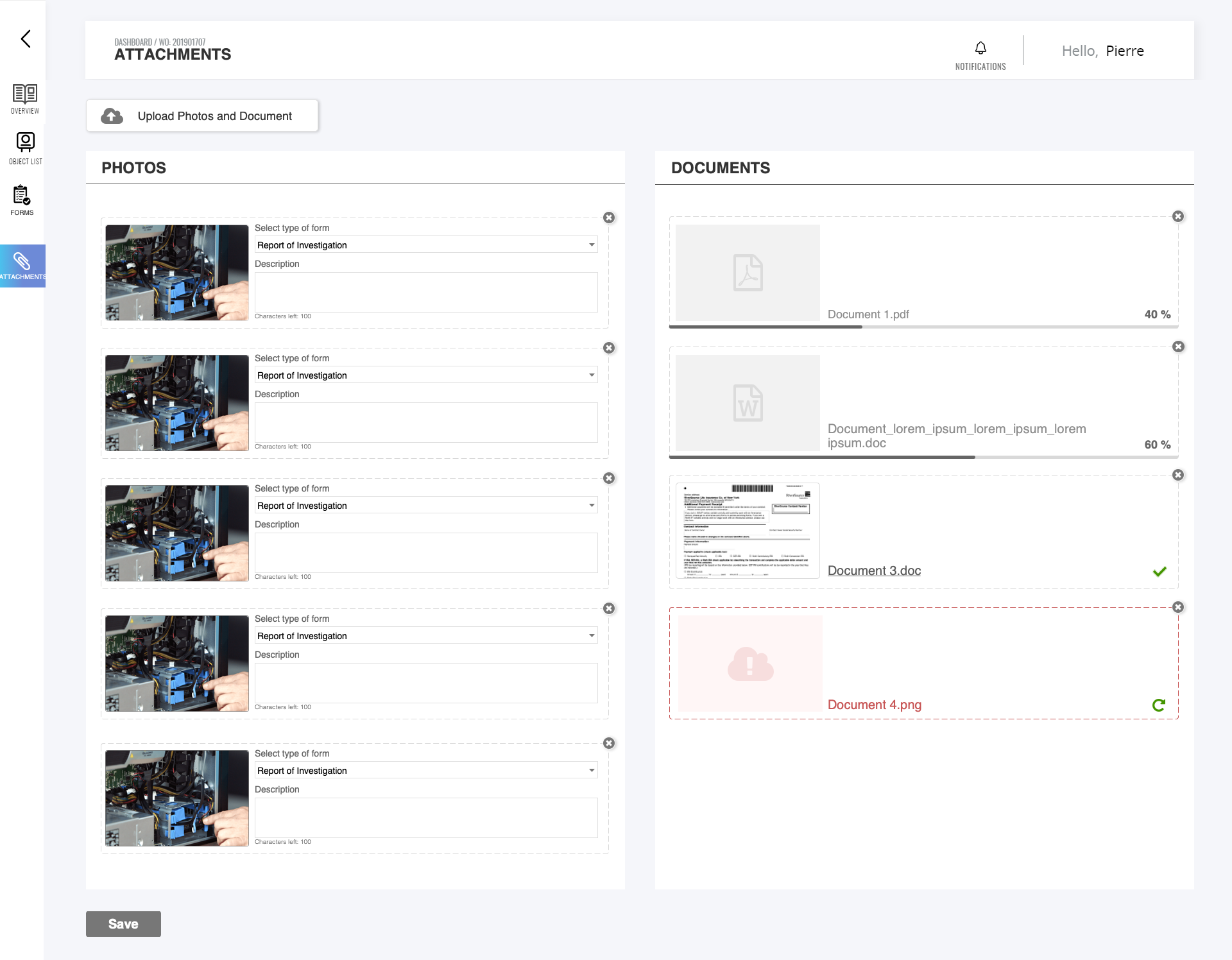
  • Photos linked to specific findings, not loose in a camera roll
  • Works offline — connectivity is not guaranteed in a boiler room
For claims

Intake that matches what the field sends.

  • Structured data from the moment of inspection
  • Photos visible alongside the findings they belong to
  • Adjuster surface designed around the inspection record, not around forms
For the business

Higher data quality, faster turnaround.

  • Fewer transcription errors entering claims
  • Inspection-to-claim cycle measurably shorter
  • Accessible to inspectors of all ability levels (AODA / WCAG)
iii. My role

Interaction lead across tablet and web, in parallel.

Designed for two very different users — inspectors in the field, adjusters at the desk — and the data path between them.

i

Field research with inspectors

Spent time with inspectors on real sites — basements, plant rooms, manufacturing floors. Learned what one-handed use, glare, and dirty gloves do to a UI before designing for them.

ii

Tablet interaction design

Designed the Android app: data capture flows, photo-to-finding linking, offline-first sync model, large-touch-target patterns. Built for the actual conditions of field work.

iii

Web claims surface

Designed the adjuster experience: inspection record as the central object, photos in context with findings, claim creation pre-populated from inspection data.

iv

Workshop facilitation

Ran cross-team workshops with inspectors and adjusters — often the first time they'd been in the same conversation. Surfaced the data handoffs that needed redesigning.

Cross-functional alignment

Four groups. One data record they all had to work with.

Inspectors
Wanted: a tool that worked one-handed in a basement.
Claims adjusters
Wanted: structured data, photos in context, no transcription gaps.
Compliance
Wanted: every inspection auditable, signed, timestamped.
Engineering
Wanted: offline-first sync that wouldn't corrupt records on reconnect.

The resolution: a single inspection record as the source of truth — captured on tablet, synced when connectivity returns, and rendered for adjusters as a structured object rather than a re-typed form. Photos are linked to findings at capture time, not afterwards. Compliance metadata (timestamp, location, inspector signature) is captured as a side effect of doing the work, not as a separate step.

iv. Key product decisions

Four decisions shaped by the field.

Each decision came out of watching the work, not from a whiteboard. The field has opinions; we listened.

01
Connectivity · Offline as the default

Offline-first capture, not "syncs when online."

Problem
Boiler rooms and basements have no signal. A tablet app that needs the cloud to work is a tablet app that doesn't.
Decision
Design the app to assume no connectivity. Every interaction works offline. Sync happens silently when the inspector returns to coverage. Conflicts handled at the field-level granularity, not the document.
Result
Inspectors can complete an entire inspection — capture, photos, sign-off — in a Faraday cage. Sync is a background concern, not a workflow step.
Tradeoff
Offline-first sync is expensive to build and harder to test. We accepted the engineering complexity rather than ship something that would fail in the actual environment of use — because a "mostly online" inspection tool would have been worse than paper.
02
Data integrity · Photos in context

Photos linked to findings at capture, not after.

Problem
Photos taken on a separate camera lived in a separate roll. Back at the desk, inspectors had to remember which photo referenced which finding. Sometimes they got it wrong.
Decision
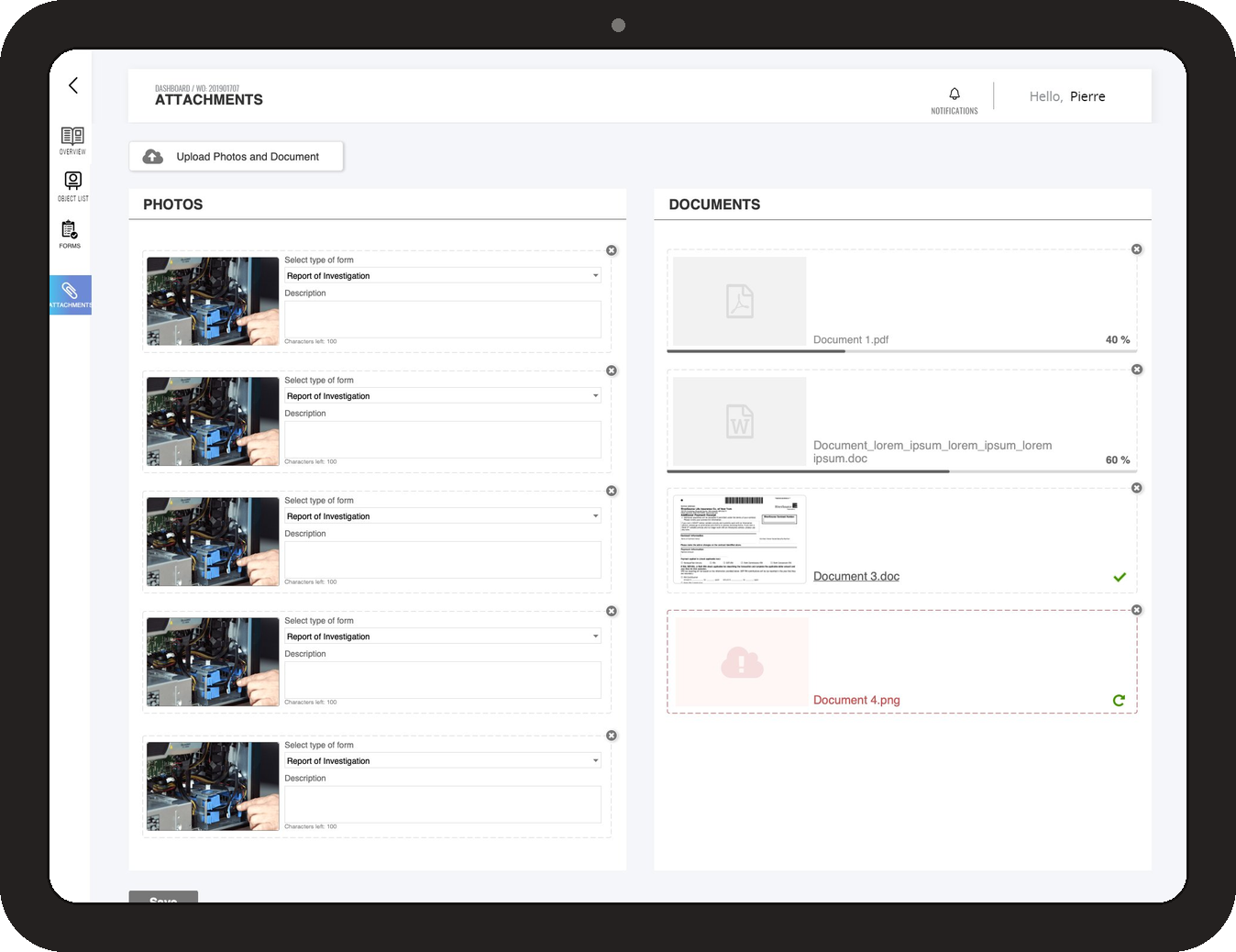
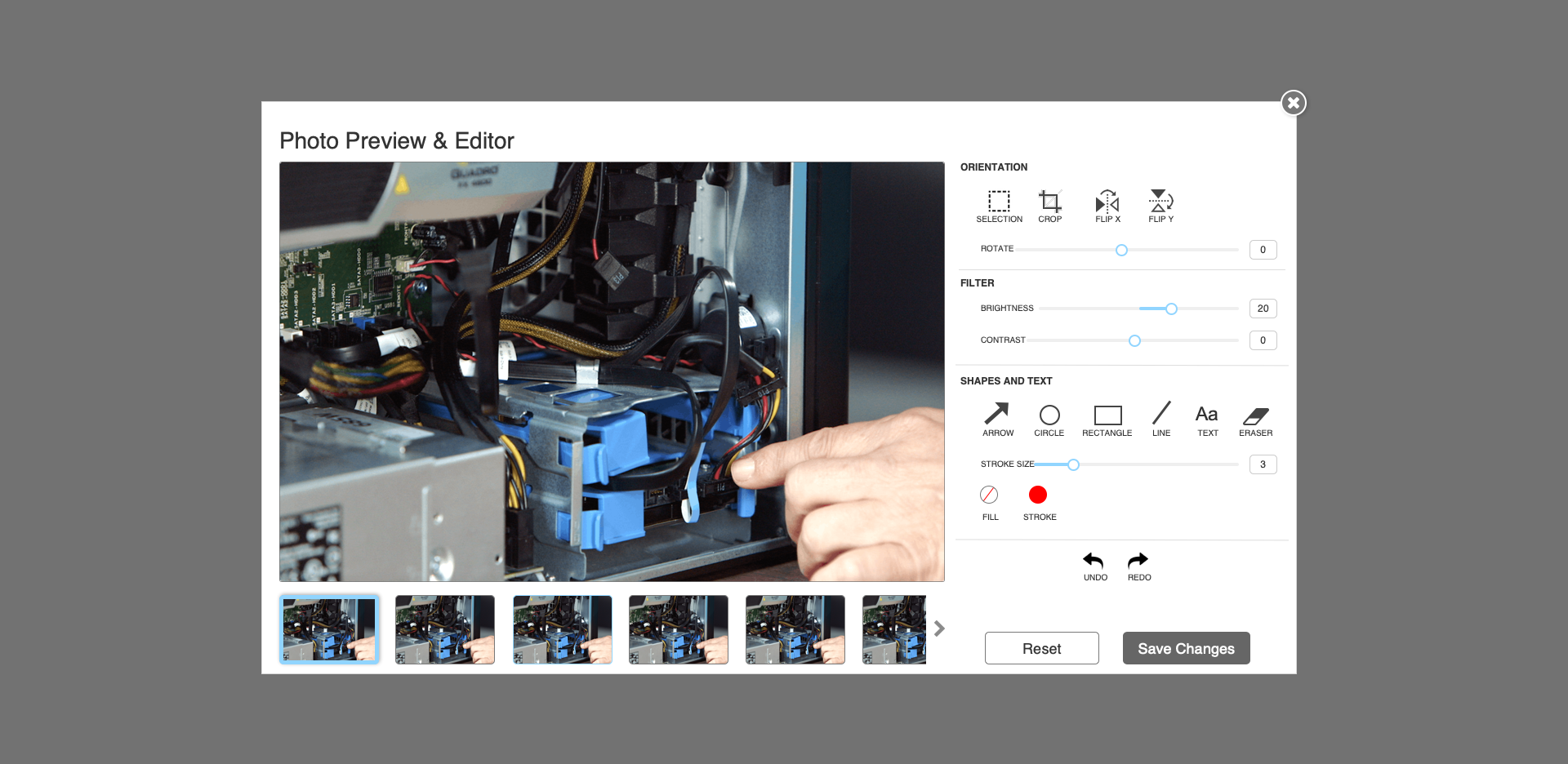
Photo capture lives inside the finding. Tap to add — the photo is annotated, timestamped, and linked to that specific defect at the moment it's taken.
Result
Adjusters open the inspection record and the photos are already in context. Re-pairing is no longer a workflow.
Tradeoff
Inspectors initially asked for a "general photos" pool, fearing they'd lose photos that didn't fit a finding. We added a "general site photos" affordance separate from finding-specific photos — both linked to the inspection, neither orphaned.
03
Ergonomics · Designed for the basement

One-handed, gloved, low-light usable.

Problem
The inspector's other hand is holding a flashlight, a probe, or the equipment itself. The tablet has to be operable with one hand, often while wearing gloves, often in poor light.
Decision
Oversized tap targets, high-contrast UI, thumb-reachable primary actions, gesture support for common tasks. Tested with actual inspectors in actual conditions — not on a desk.
Result
The app works in the conditions of use. Inspectors don't have to set the tablet down to operate it.
Tradeoff
Oversized tap targets reduce screen density. We pushed back against the impulse to "fit more on screen" — for a one-handed, gloved user in a basement, less per screen with bigger targets is the right answer. Density goes up on the adjuster's desktop, where it belongs.
04
Adjuster experience · Designed around the record

Claims intake organized around the inspection, not a form.

Problem
The old claims system was a form to be filled. Inspection data went in as text. Photos went in as attachments. The structure of the field record was lost on the way to the desk.
Decision
The adjuster sees the inspection as it was captured — findings, photos, severity, location — and creates the claim from that structured view. No re-keying, no copy-paste, no "where did that photo go."
Result
Adjusters spend their time on the judgement calls — coverage, severity, next steps — not on data entry.
Tradeoff
Designing around the inspection record meant the claims system had to be rebuilt, not just integrated with. We made the case that an integration of a broken handoff would just speed up the breakage. Leadership backed the larger rebuild.
v. A look at the surface

How the decisions show up in the product.

Two recreated views — the tablet field-capture and the web claims surface — annotated to show how the inspector's work flows through to the adjuster's screen.

A note on what's shown. The production system shipped at HSB / Munich Re. The screens below are structural recreations — same IA, same patterns, with HSB / Munich Re visual identity and any production design treatments removed. The goal is to show the decisions, not the deliverable.
View 01 · Tablet field capture

A finding, a photo, a severity — captured together.

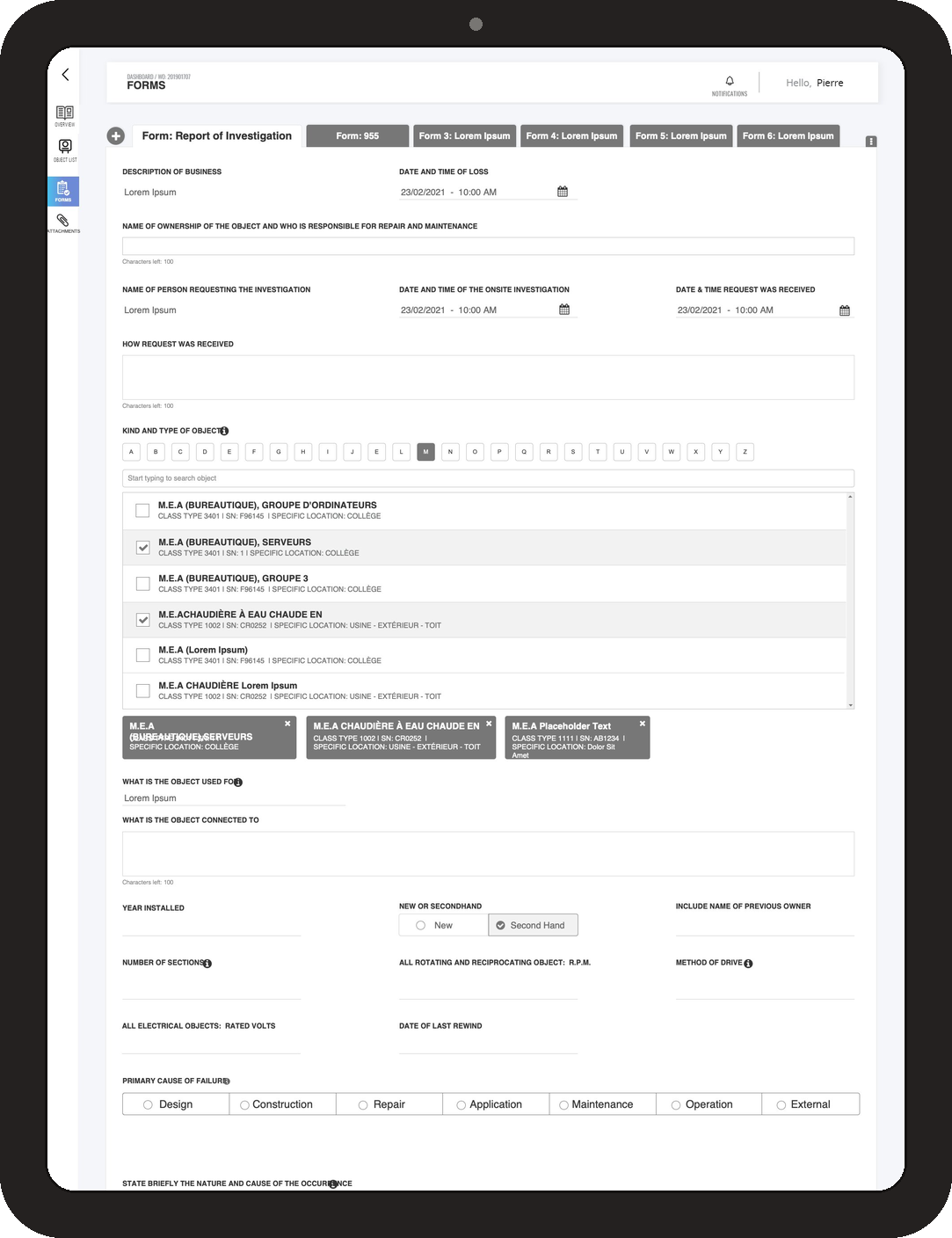
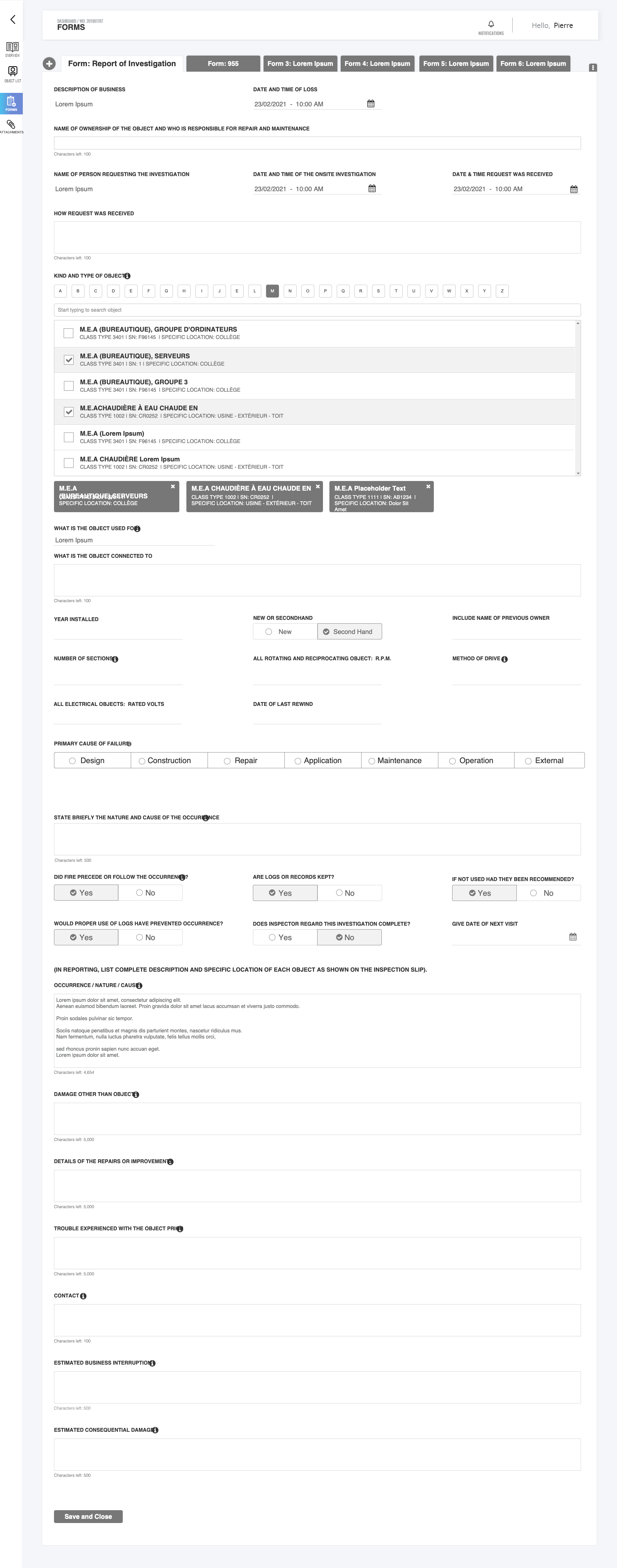
The inspector taps to add a finding. Photo, severity, location on the equipment, and notes are captured in one place. Offline by default; sync happens when coverage returns.

Tablet field capture — recreated structure
Tablet capture mockup
Drop your cleaned-up Figma export here as
screens/hsb-tablet.png

Target: ~1600 × 1040px (tablet landscape feel)
Before exporting:
  • Replace HSB / Munich Re brand identity with neutral mark
  • Use a fictional equipment type / asset ID
  • Generic inspector name in any sign-off state
  • Use placeholder photos, not real inspection imagery
A
Finding-first structure
Every screen is organized around the finding being captured — not a form to be filled in order.
B
Photo inside the finding
Tap to capture — photo is annotated and linked at the moment it's taken. No camera roll, no re-pairing.
C
Thumb-zone primary actions
Save, Next, Add Photo all sit within thumb reach for one-handed operation in the field.
D
Offline state, made calm
No anxiety-inducing red banners — a small, persistent indicator confirms data is captured locally and will sync on its own.
View 02 · Web claims surface

The inspection record, as the adjuster sees it.

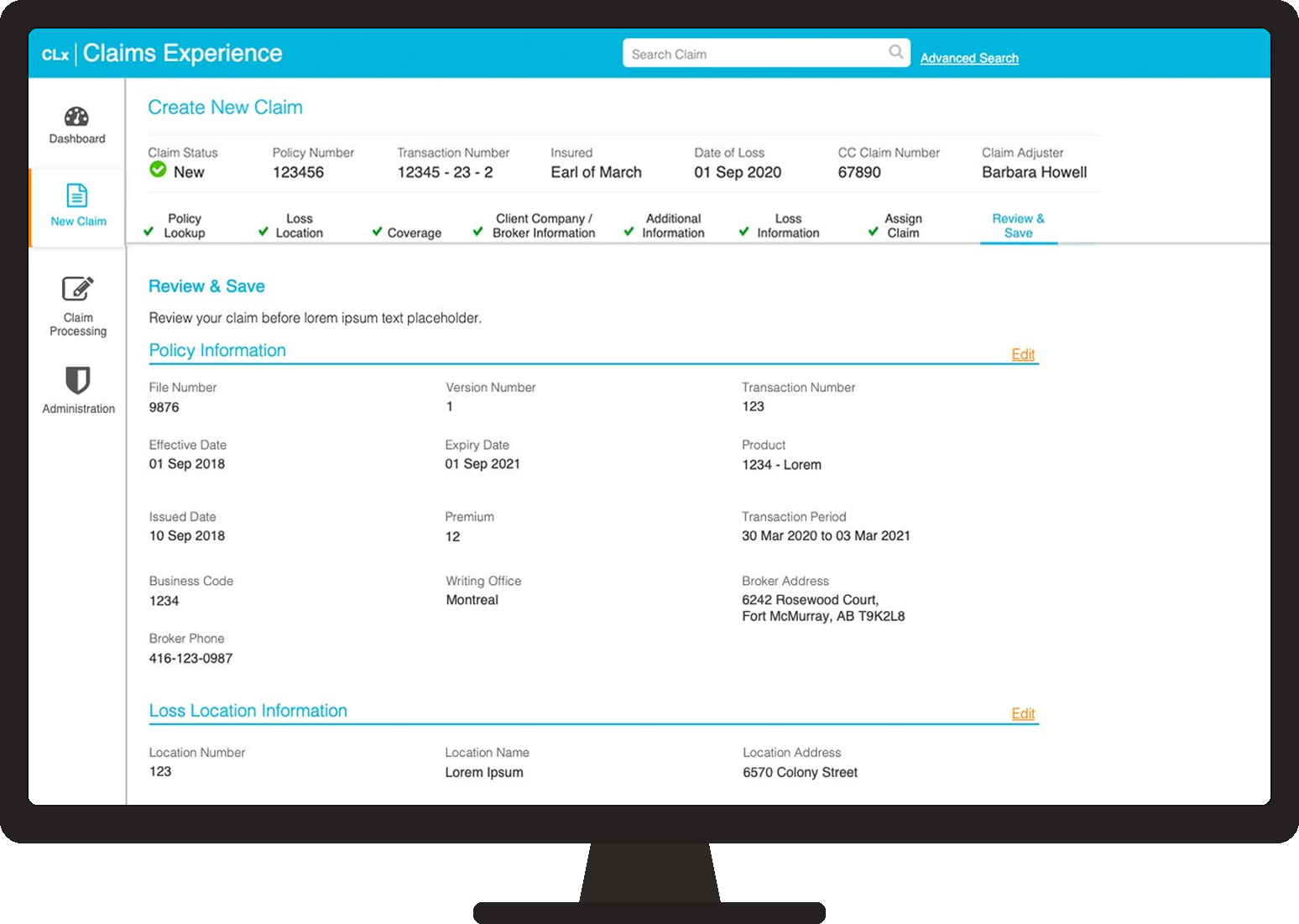
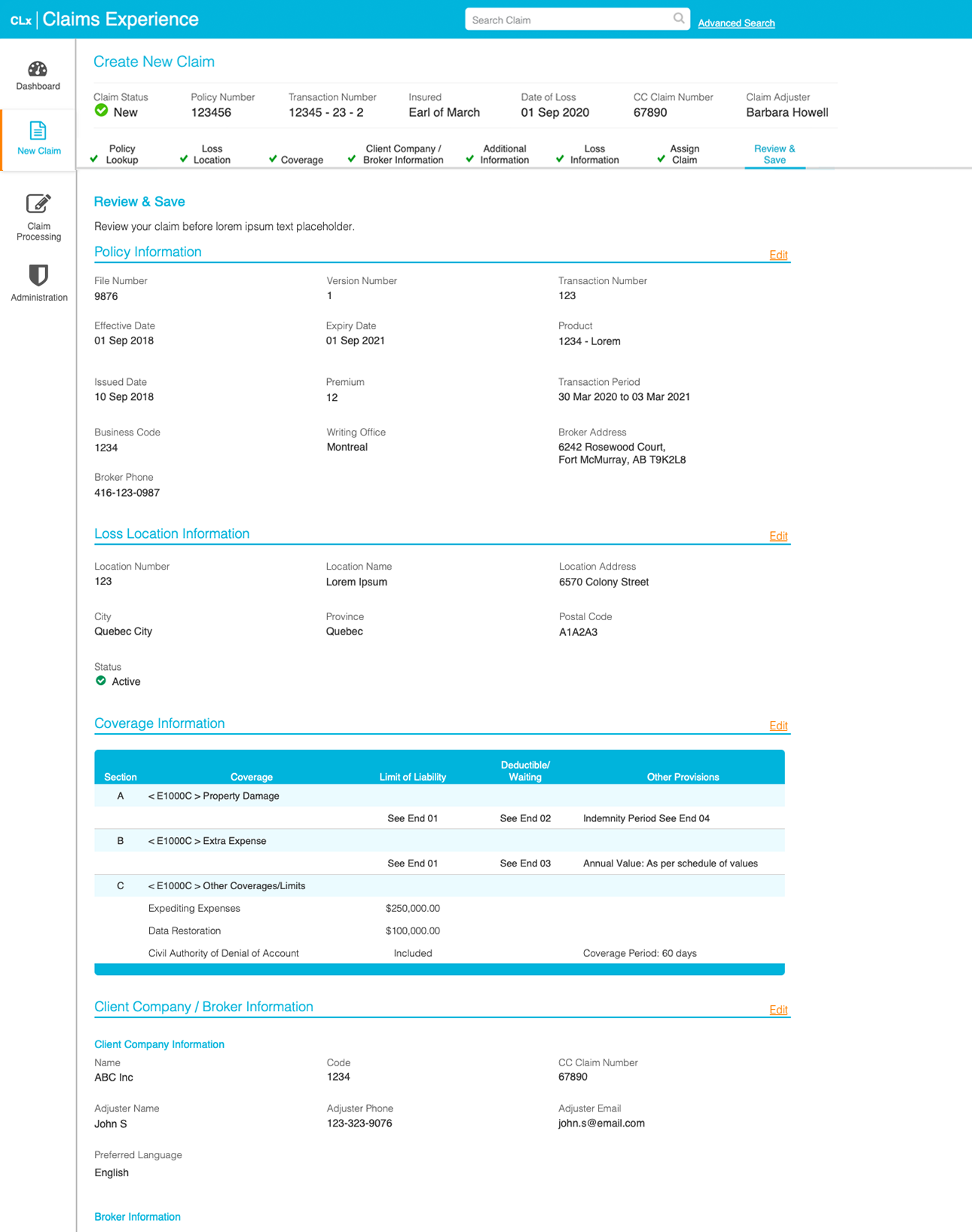
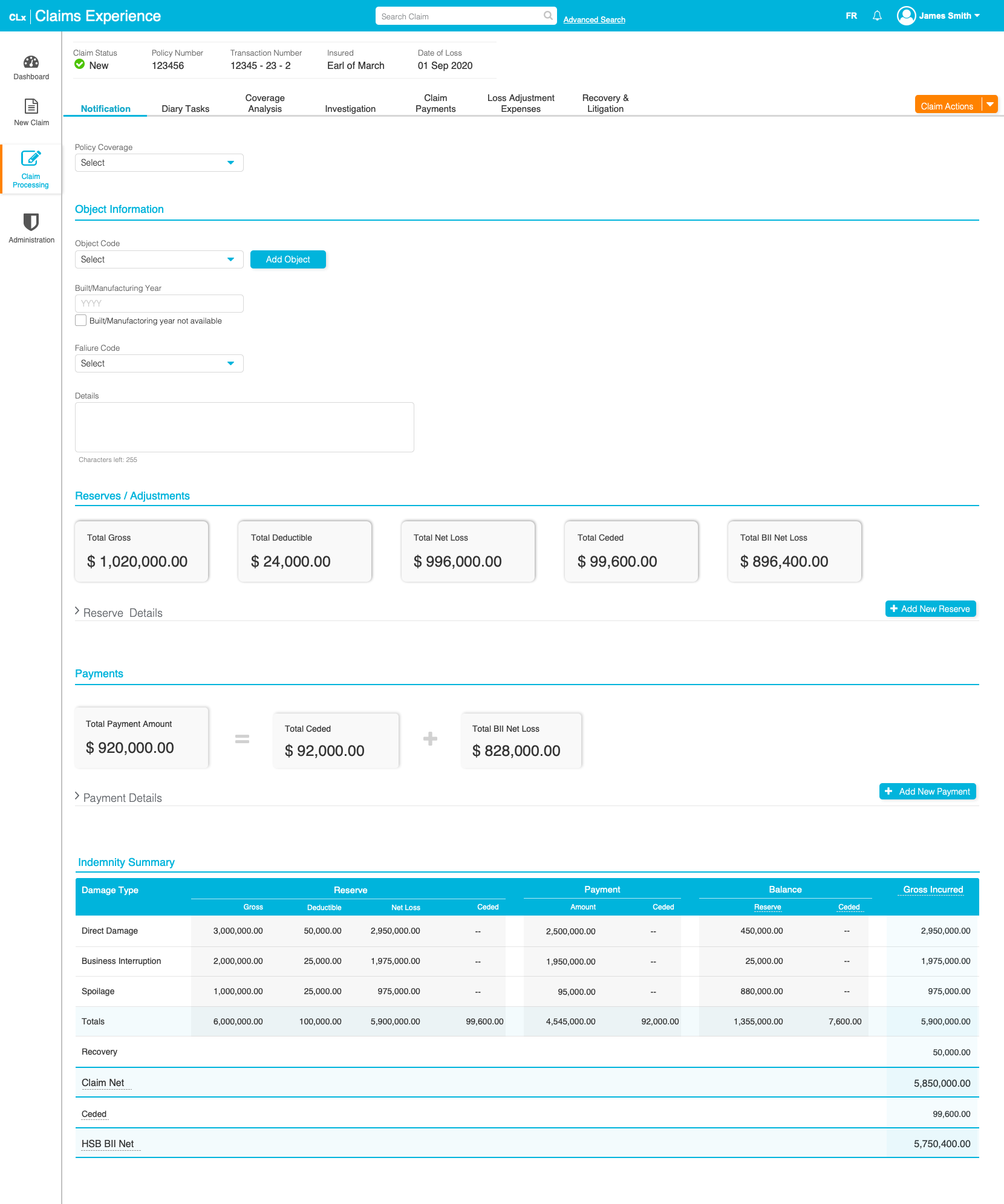
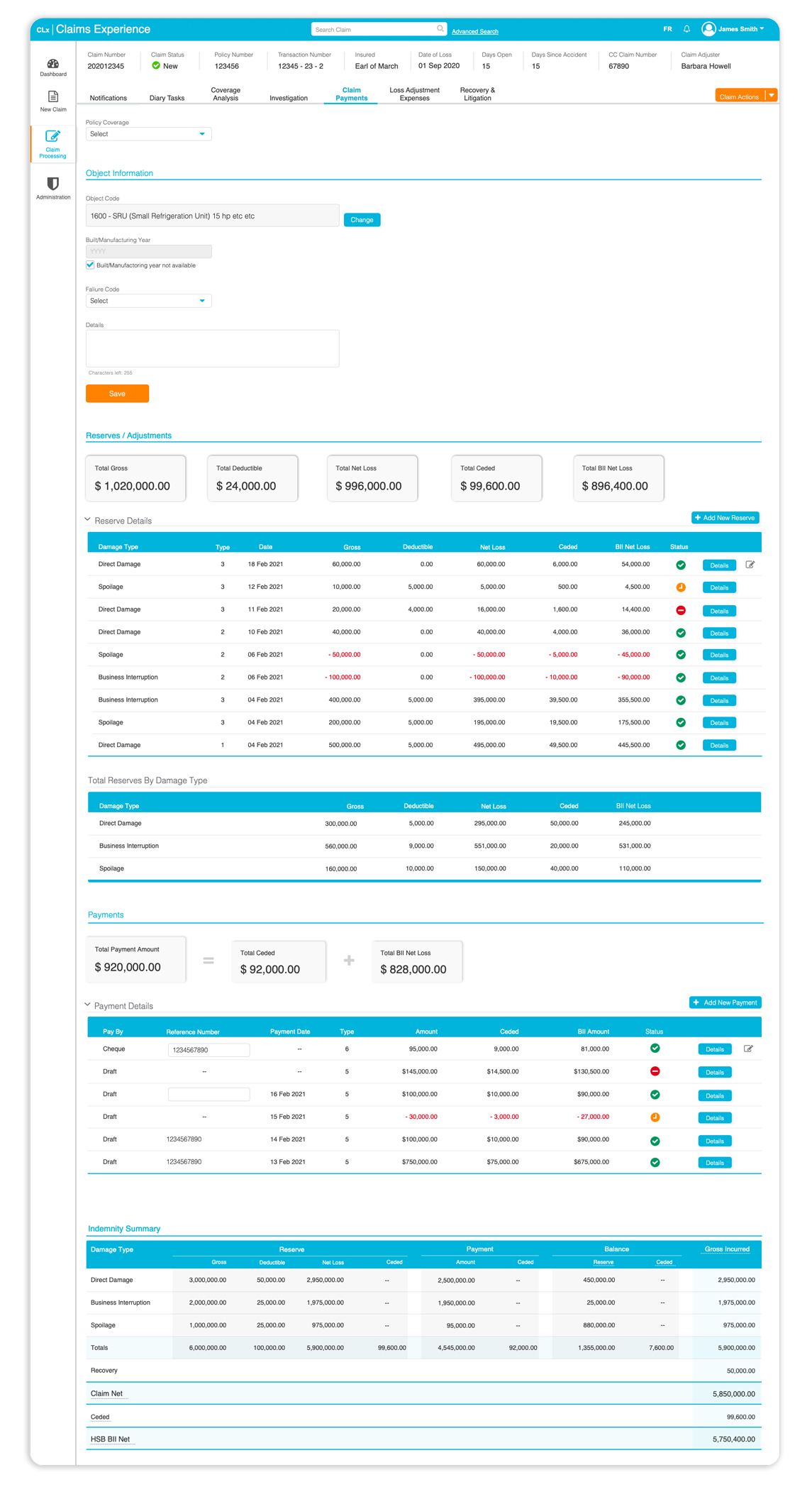
Adjusters open the inspection and see what the inspector saw — findings, photos in context, severity already classified. Claim creation pre-populates from the structured record.

Web claims surface — recreated structure
Claims surface mockup
Drop your cleaned-up Figma export here as
screens/hsb-claims.png

Target: ~1600 × 1040px (3:2 ratio)
Before exporting:
  • De-brand all HSB / Munich Re visual identity
  • Use fictional policy / claim numbers
  • Generic adjuster and customer names
  • Placeholder photos and findings text
E
Inspection as the central object
The page is organized around the inspection record — findings, photos, severity — not a form to be filled in.
F
Photos in context with findings
Adjusters see what the inspector saw. No more cross-referencing a photo grid against a text log.
G
Create claim from inspection
One action turns the inspection into a draft claim with all relevant data pre-populated. Adjusters review and adjust — they don't re-enter.
H
Audit metadata, present but quiet
Timestamp, inspector signature, location coordinates — all visible on expand, not cluttering the primary view.
Both screens have been recreated outside the production environment for portfolio use. Underlying decisions, IA, and patterns reflect what shipped; visual identity, equipment data, and personnel shown are fictional.
vi. Impact

What changed.

The most measurable change was the elimination of re-keying. The more important one was the change to the inspector's day.

Re-keying step
0×
Eliminated entirely — capture once, used everywhere
Surfaces in parallel
2
Tablet field-app and web claims, designed as one system
Accessibility
AODA+ WCAG
Compliance across both surfaces
— And the parts you can't put on a dashboard

Inspectors got hours back in their day. The transcription step they used to do at the office was eliminated. Some used the time to fit more inspections; some used it to go home earlier. Both were good outcomes.

Adjusters stopped chasing missing photos. The "which photo goes with which finding" workflow disappeared because the answer was already in the record.

Inspection-to-claim cycle time fell. Claims could be initiated within hours of the inspection — not days, after the re-keying was done.

Inspectors and adjusters started talking to each other. The workshops that surfaced the data handoffs also surfaced the relationships. Several pairs continued working together directly after the project ended.

vii. In hindsight

What I'd do again, and what I wouldn't.

↻ Would do again

Go to the field before designing for it.

Every important decision in this project came out of watching an inspector work, not from a research deck. The one-handed UI, the photo-in-finding, the offline-first sync — all of them are wrong if you design them at a desk.

→ Would push harder on

Adjuster training as part of the rollout.

The tablet rollout went smoothly because inspectors had been part of the design. Adjusters had been consulted but not co-designed with as deeply, and the new claims surface took longer to adopt. Next time: equal involvement from both sides of the handoff.

Back to · 01

A scalable onboarding ecosystem for enterprise banking — RBC Capital Markets.